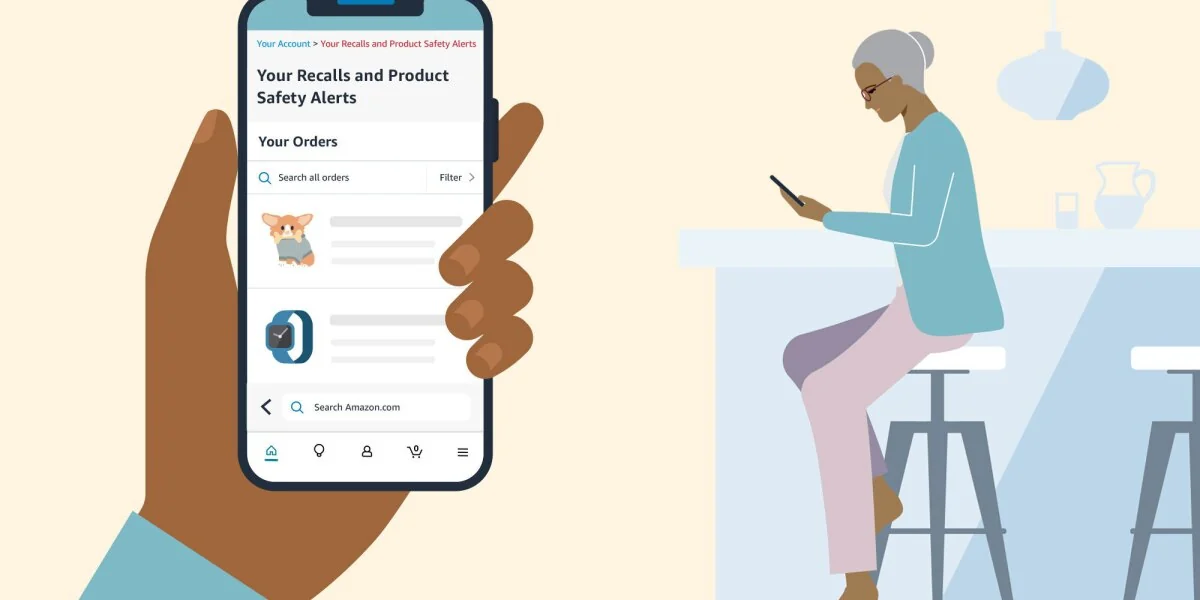
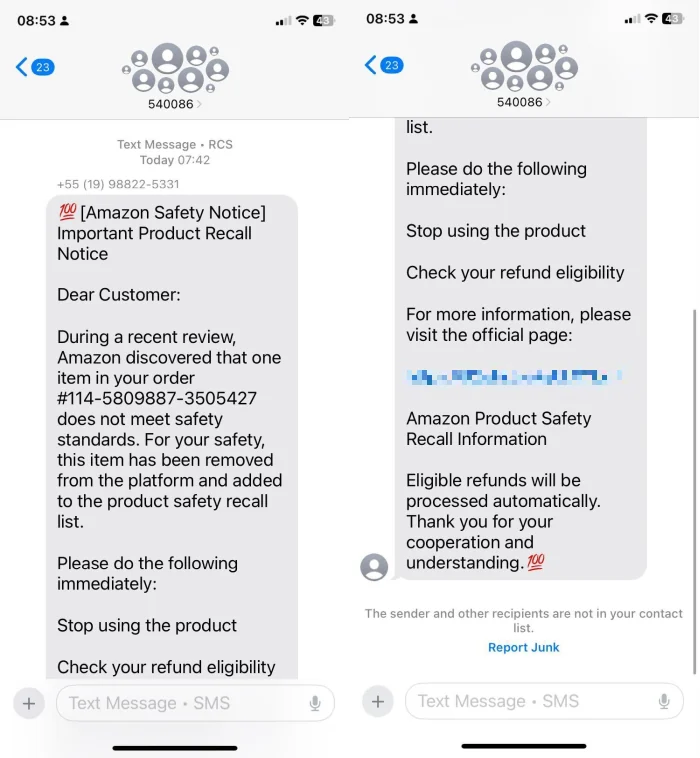
Treat an unexpected Amazon recall text message as unverified. Do not tap its link, reply, call a number in the message, or enter an Amazon password, one-time code, or payment information. Instead, open the Amazon app yourself or type Amazon.com into your browser and check your account. The Federal Trade Commission has specifically warned about texts that claim an Amazon purchase failed a quality inspection or was recalled and then offer a refund through a link. That link may lead to a phishing site rather than a real recall remedy.
A text is not enough to prove that a product is recalled, even if it shows a believable order number or uses safety language. A genuine notice should also be visible through an official Amazon account channel or an official recall notice. If you find one, match the exact model, UPC, lot or batch code, date code, or other identifiers before deciding that your item is affected.
Quick answer: treat the recall text as unverified
The safest response is to leave the message untouched and verify the claim through a channel you already trust. Amazon says fraudulent recall notices may pressure shoppers to click a third-party link to see whether an order qualifies for a refund. Those pages can be designed to collect login credentials, payment details, or personal information. Amazon's current guidance says genuine recall information can be checked inside your account under areas such as Messages, Your Orders, and Your Recalls and Product Safety Alerts.
This does not mean you should ignore a possible product hazard. It means you should separate the safety question from the message. First, avoid the text's link. Second, check Amazon and an official recall source independently. Third, follow only the remedy stated in the verified notice. A missing alert does not by itself prove a product is safe, so search using the product's exact identifying information if you remain concerned.
How the Amazon recall text scam works
The scam combines two powerful prompts: fear that a product may be unsafe and the promise of quick money. The text may say that a “routine review” or “quality inspection” found a problem with something you bought. It may tell you to stop using the item, claim that no return is needed, and offer a full refund if you act through a supplied link.
According to the FTC's Amazon refund-text warning, this is a phishing pattern. The supposed refund is the lure. A linked page may imitate an Amazon sign-in screen and ask for an email address, password, one-time verification code, card details, or other information. The scammer can then try to take over an account, make unauthorized transactions, or reuse stolen credentials elsewhere.
Common warning signs in the message
- An unexpected recall or refund: the text refers vaguely to “one of your purchases” or does not clearly identify the product.
- A link you did not request: especially a shortened URL, an unfamiliar domain, or an address that merely contains the word “Amazon.”
- Pressure to act immediately: the message creates a deadline or says you must confirm eligibility now.
- A refund that sounds automatic: it promises money without first showing an official notice and its exact remedy.
- A request for sensitive information: it asks for a password, one-time code, full card details, bank information, or a gift card.
- Contact details inside the text: it tells you to call, reply, or use support information supplied by the sender.
Good spelling, Amazon-style colors, a polished layout, or a realistic order number do not authenticate a message. Scammers can copy branding and manufacture order references. The reliable test happens outside the text.
How to verify whether an Amazon recall is real
Use a clean verification path. Close the message, then open the Amazon Shopping app from your device or type amazon.com into a new browser window. Do not copy the text's URL, search for the sender's phone number, or call a number included in the message. If you need help, reach Amazon Customer Service from the official app or website.
Check Amazon without using the text
Review Your Orders and the Amazon Message Center for a notice associated with the purchase. Amazon also provides a personal Your Recalls and Product Safety Alerts page and a public Product Safety and Recalls Alerts list. Menu names and locations can change, so enter through your account rather than trusting directions contained in a text.
Amazon explains that a genuine affected-customer alert may appear as a personalized email and a banner in Your Orders, linking to the hazard details and the available action. A recall-specific option might be a refund, return, repair, replacement, or another remedy. The existence of an Amazon order is not proof that every unit of that product is affected.
Match the exact product and official notice
Open the official recall notice and compare all identifiers it supplies. Depending on the product, these may include the brand, product name, model number, UPC, serial number, lot or batch code, date code, package size, manufacturing period, or vehicle identification number. A retailer name or broad product description alone is not a match.
For consumer products, search the U.S. Consumer Product Safety Commission recall database. Food, drugs, medical devices, meat and poultry products, and vehicles may instead fall under FDA, USDA FSIS, or NHTSA programs. You can also use the Product Recall Checker search or browse the latest recall records as a starting point, then open the linked agency or company notice before acting.
If no result matches, do not declare the item safe solely from that search. Try the model, UPC, brand, and product name separately, and contact the manufacturer through contact information you independently obtain when uncertainty remains.
What to do if you clicked the recall link
Your next steps depend on what happened after the click. Work through the row that matches your situation, and use a different, trusted device for password or financial-account changes if you suspect that software was installed.
| What happened | Priority actions |
|---|---|
| You opened the page but entered nothing | Close it, do not return, check for unexpected downloads or permissions, update security software, and run a scan if a download may have occurred. |
| You entered an Amazon password or one-time code | Go directly to Amazon, change the password immediately, secure reused passwords, enable two-step verification, review account activity, and contact official Amazon support. |
| You entered card, bank, or identity information | Contact the issuer or bank through a known number, monitor for unauthorized activity, and use IdentityTheft.gov for an information-specific recovery plan. |
| A file or app downloaded | Stop entering sensitive information, disconnect if active compromise is suspected, update and run trusted security tools, and get reputable technical help if symptoms remain. |
You clicked but entered nothing
Close the page and avoid interacting with pop-ups, downloads, notification prompts, or “unsubscribe” buttons. A click alone does not prove that your device or account was compromised, but you should check the browser's downloads and review any new apps, profiles, extensions, or permissions. The FTC recommends updating security software and running a scan when a phishing link may have downloaded harmful software.
Do not use the suspicious page to check whether the recall was real. Start a fresh session in the official Amazon app or website and use the independent verification steps above.
You entered an Amazon password or one-time code
Go directly to Amazon and change your password immediately. If you reused that password for email, banking, shopping, or other services, change those accounts too, using a unique password for each. Turn on two-step verification in Amazon's Login & security settings. Never give an Amazon one-time code to a caller or message sender; a code can help an attacker finish a login or account change.
Review recent and archived orders, delivery addresses, payment methods, account messages, digital purchases, and security settings for changes you did not make. Canceling or disputing activity depends on its status, so contact Amazon through its official Customer Service path as soon as you see something unfamiliar.
You entered card, bank, or identity information
Call the card issuer or financial institution using the number printed on your card, statement, or official website. Explain what information was entered and follow its instructions for securing the account, replacing a card, monitoring transactions, or disputing unauthorized charges. Do not call a “fraud department” number supplied by the text.
If you disclosed a Social Security number, bank account information, or other identity data, visit IdentityTheft.gov. It provides recovery steps based on the information exposed. Keep records of reports and account contacts, but do not continue communicating with the sender.
A file or app may have downloaded
Stop shopping, banking, or entering passwords on the affected device until you have checked it. Update the operating system and trusted security software, then run a scan and remove anything the tool identifies. If the device behaves strangely, an unfamiliar app appeared, or you granted accessibility, device-management, or remote-control permissions, disconnect it from the internet and seek help from the device manufacturer or a reputable technical-support provider.
After the device is clean—or from a separate clean device—change affected passwords and enable multi-factor authentication. A security scan reduces risk but is not a guarantee, so continue monitoring important accounts.
How to report and delete the fake recall text
- Take a screenshot if you need it for a report, but do not reopen the link.
- Use Amazon's official Report a Scam tool. Amazon also lists
[email protected]for people who are not customers. - Use your messaging app's Report Junk or Report Spam control.
- Forward the unwanted text to 7726 (SPAM), which helps the wireless provider identify similar messages.
- Report the attempt at ReportFraud.ftc.gov, especially if you lost money or disclosed information.
- Block the sender and delete the message after reporting it.
Do not reply “STOP” to a suspicious sender. A reply may confirm that the number is active, and the text is not a legitimate marketing subscription that deserves an unsubscribe response.
What to do when the recall is genuine
Read the complete official notice and follow its exact instructions. It may tell consumers to stop using the product immediately, unplug it, keep it away from children, arrange a repair, install an update, return it, destroy it in a particular way, or contact the recalling company. Do not mail, discard, or dismantle a potentially hazardous product unless the notice tells you how.
Save the product, label, model or lot code, order record, and photos if the remedy requires them. Use only the consumer contact and remedy shown in the verified notice. A real recall does not always mean an automatic refund, and one seller's policy does not broaden the official affected range.
Amazon recall text message FAQ
Does a real-looking order number prove the text is genuine?
No. Amazon warns that impersonation scams can use fake order numbers and phishing URLs. Verify the order and any safety alert inside your account without using the text.
Will a real recall always offer a refund?
No. The remedy is notice-specific. It may be a refund, return, repair, replacement, software update, inspection, disposal instruction, or another action. Follow the verified recall notice rather than a promise in a message.
Is Product Recall Checker an official government or Amazon service?
No. Product Recall Checker is an independent website that organizes public recall information to make searching easier. It does not replace Amazon, a government agency, the manufacturer, or the official recall notice. Always confirm the affected identifiers and remedy at the original source.
Comments
Comments are reviewed before publication. Do not post personal information, serial numbers, medical details, or emergency reports. For urgent safety concerns, use the official agency contact in the recall notice.
Sign in with Google to leave a comment
Loading comments...