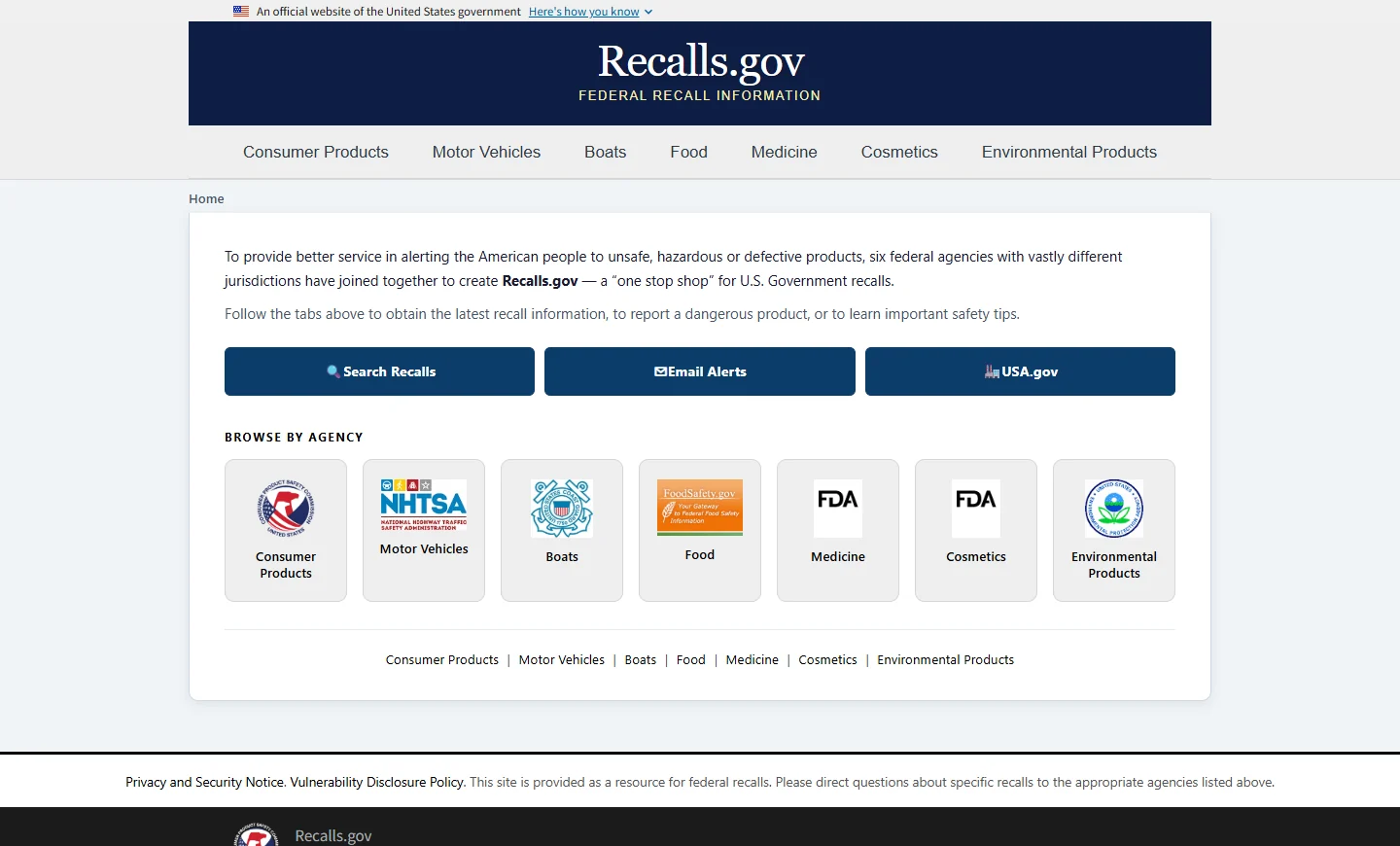
Updated November 18, 2026. Open Recalls.gov, choose the category that fits your item, and follow the link to the federal agency that issues the notice. A food search may require a lot code or establishment number. A household product search usually starts with the exact model or a date code, while a car search can use its 17-character VIN. After you find a candidate recall, compare the identifier on your item with the one in the issuing agency's notice. Recalls.gov federal starting page.
Start with the agency that owns the notice
The home page has seven categories at the top and again under Browse by Agency. The labels reflect what a consumer is holding, so a packaged food and a household kettle lead to different destinations. A vehicle and a child restraint have a common transportation route. The six agencies behind the site also have their own search pages, where they display the details needed for each type of item. Federal agency recall directory.
| Item | Federal route | Collect these identifiers |
|---|---|---|
| Food | Food then FDA or USDA FSIS | Exact name, size, UPC, lot or date, and establishment number where applicable |
| Household item | Consumer Products then CPSC | Brand, model, serial, date code or other marking named in the notice |
| Vehicle | Motor Vehicles then NHTSA | 17-character VIN for an individual vehicle |
Keep the label in front of you while you search. An online order title or a receipt can help you discover a notice, and the item gives you the full code you need to verify it. If the first result is an article, open the original agency announcement and note its date before using the instructions.
What the Search Recalls page shows
Choose Search Recalls from the home page to see links to CPSC, FDA, USDA's Food Safety and Inspection Service (FSIS), NHTSA, EPA and the U.S. Coast Guard. Pick the agency first. Search by brand or model at the destination to find the notice, then use the exact identifier as a second check. This small change in order helps when the package carries a long lot number that the first search box never finds. Search Recalls agency links.
The Email Alerts page takes you to subscription options for CPSC, FDA, FSIS and NHTSA. Subscribing can help you hear about a future notice. For an item you already have, start the lookup today and save the agency page that matches it. Federal recall email subscription links.
Match food recalls to the package in your hand
The Food tab points to FoodSafety.gov and describes the FDA and USDA FSIS roles. Start there if you heard about a recall but missed the exact brand or product. The issuing notice is where you can compare the package in your kitchen with the affected product. If a public health alert or outbreak update appears alongside a recall, open the record that gives consumer instructions for the product you have. Recalls.gov Food and FoodSafety.gov recalls and outbreaks.
Write down the brand and full food name before you read the date or code. A food company may sell multiple sizes or flavors and produce many lots under one name. A matching UPC can identify a package version, while the date or lot can narrow the result to the run named in the notice. Our food recall lookup guide walks through the food-specific sources in more detail.
When to check FDA
Use FDA for notices about products such as packaged foods, produce, dietary supplements and pet food. A real example is the ALDI recall FDA published on November 17, 2026. It lists two 9-ounce items, Priano Protein Carbonara Tortelloni and Priano Protein Herb & Cheese Tortelloni. Both show lot T9101926 and a best-if-used-by date of December 18, 2026. The notice lists select stores in Alabama, Georgia, North Carolina and South Carolina, including purchases made online from stores in those states. Consumers with affected products should discard them or return them as instructed in the notice. FDA-posted ALDI recall.
When to check USDA FSIS
For USDA-inspected meat, poultry and egg products, look for the inspection mark and establishment number. The number identifies the plant, and the label can show it inside the mark, elsewhere on the package or at the location stated near the mark. Copy the prefix with the digits. Then compare the description, dates, weight and lot or production codes listed in the FSIS notice. A plant can make a number of products, so keep checking the specific package after you recognize the plant. FSIS establishment number guide and FSIS product-matching help.
Check household products by model and date code
Use Consumer Products for many items found in a home, including appliances, furniture, electronics and some children's products. Follow the link to CPSC's search, then try the company name, brand or product model. The site also has date, hazard and category filters. Start with the model and brand and add filters when the results are too broad. If a model search yields little, try a shorter brand-and-product search and check the exact code in each candidate notice. Consumer Products at Recalls.gov and CPSC recall search.
On October 29, 2026, CPSC listed a recall for DREO model DR-HSH015 space heaters made from April 2025 through January 2026. The model and manufacture month appear on the underside of the heater. The same notice lists a sales window from September 2025 through October 2026, so the purchase receipt and manufacturing code answer different questions. For an included unit, the notice says to stop using it immediately and contact DREO for the free replacement. CPSC notice 27-054 and its photos.
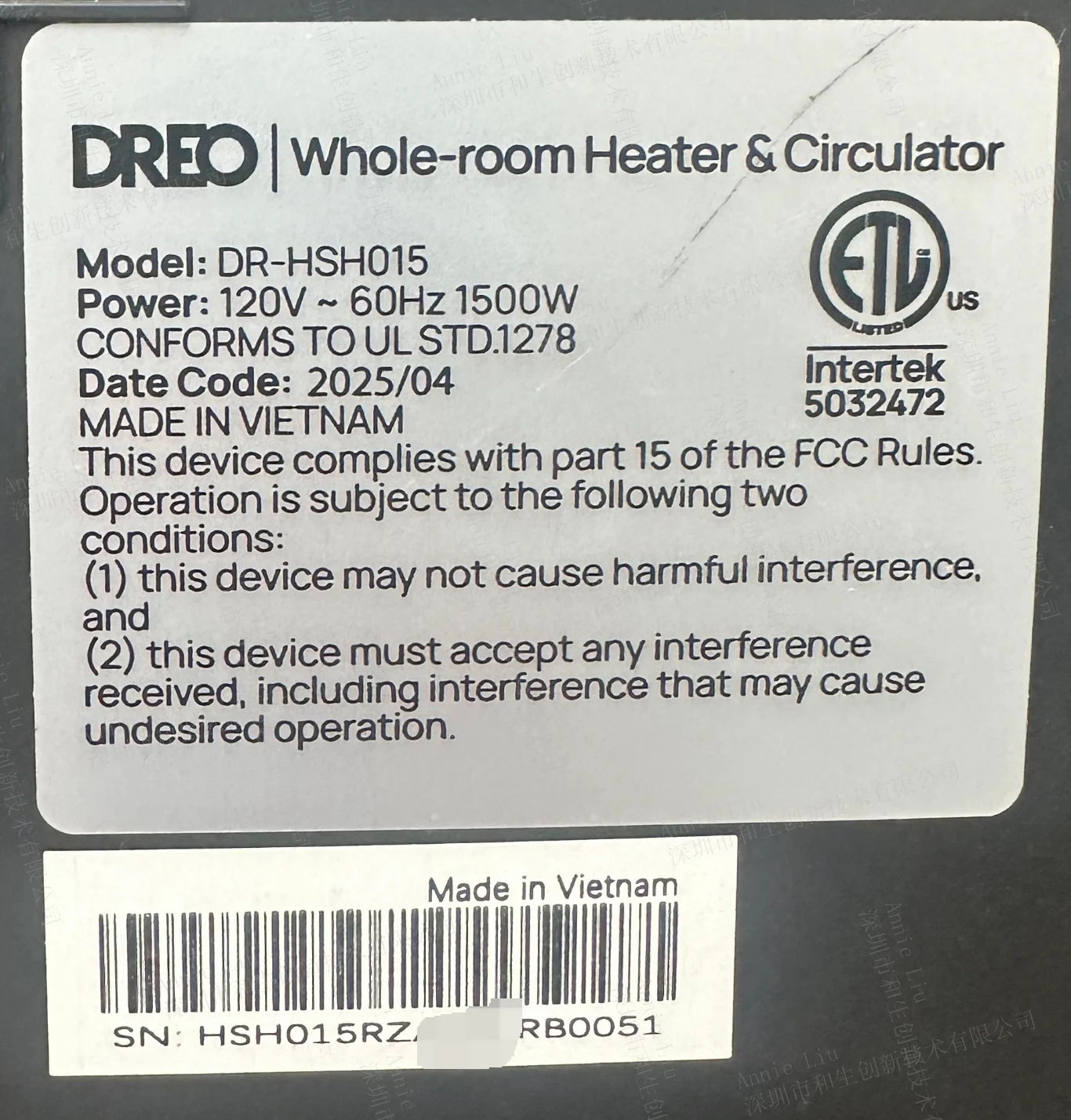
A product photo in a notice can help you locate the label. Use the letters and numbers in the description to make the final comparison, especially when different versions look the same. On some goods you may need the box as well as the item, because the notice can specify a code printed on the packaging. Our household recall category is another starting point for locating candidate notices.
Use the official CPSC Recall App
The CPSC Data page links to the agency's free mobile recall search app. Open that page on your phone and follow its Recall App link. Use CPSC search for the brand or product you are checking, then read the notice for its model, date, serial and remedy details. Continue to FDA, FSIS or NHTSA for those agencies' records. Current CPSC app entry and CPSC's announcement about the app.
Use NHTSA for a vehicle recall check
Choose Motor Vehicles and follow the recall link to NHTSA. For a specific car or truck, use its 17-character vehicle identification number. NHTSA shows where to find it near the lower left of the windshield. The registration card also carries it. Its public tool accepts a VIN or a license plate for a check of unrepaired recalls for supported vehicles. If you only know the year, make and model, use those details for a general search, then get the VIN before you act on a result about an individual vehicle. Motor Vehicles at Recalls.gov and NHTSA recall lookup and scope.
Imagine that you're looking at two used vehicles from the same year. The year, make and model search can help you read about a campaign, and a separate VIN search for each vehicle can show which one has an open recall. For a result that says there are zero unrepaired recalls, NHTSA's scope matters. There may be a repair that was completed earlier or a recent campaign for which VINs are still being added. NHTSA also notes limits for many recalls older than 15 years in its VIN and plate searches. If a notice mentions your vehicle but the lookup is inconclusive, contact the manufacturer with the VIN and campaign number. NHTSA VIN search limits.
Look up car seats, tires and equipment
NHTSA provides separate searches for car seats, tires and equipment. For a car seat, start with the brand and model and compare the date of manufacture when the notice asks for it. A booster seat can have its own campaign, independent of the recall status of the car carrying it. For tires, get the brand, size and the full DOT Tire Identification Number if it is safely visible. A tire service professional can help locate an inaccessible code. Follow the notice for the actual scope and manufacturer contact for that item. Cribs, dressers and other household children's products typically lead back to CPSC. NHTSA seat and equipment search instructions and NHTSA TireWise label guidance.
Find medicine, cosmetics, boating and environmental recalls
Choose Medicine to reach FDA pages for drugs, devices and other medical products. For a drug, get the exact name and strength and check the lot on the label. If the notice lists a National Drug Code, compare it as well. For a device, the notice may ask for the model, serial, lot or Unique Device Identifier. Discuss the recall with your pharmacist or treating clinician before changing prescribed care, and refer to the agency notice for the actions it directs. Medicine and medical product agency links and FDA drug recall guidance.
Use the separate Cosmetics tab for FDA notices about makeup, skincare or personal care products. If the same product line contains several shades, formulas or package sizes, you can start with the brand and then compare the exact version and code named in the FDA notice. Cosmetics Recalls & Safety Alerts.
The Boats tab leads to the U.S. Coast Guard for recreational boats and related equipment. Its search can take a manufacturer identification code, company name or recall number, with additional model and model-year fields. If you recognize a brand in the results, open the specific Coast Guard record before using its remedy instructions. Recalls.gov boating category and U.S. Coast Guard recall search.
The Environmental Products tab leads to EPA pesticide and emissions resources. A pesticide registration lookup helps identify a product. For a specific recall or safety question, open the applicable EPA information or use its contact route. An emissions inquiry can require the test group or engine family on the emissions label. For a highway vehicle safety defect, use the NHTSA route described above. Environmental Products and EPA vehicle and engine emissions recalls.
Confirm the notice and read the consumer action
When a search returns a candidate, open its details and work through the same three checks whether you are holding a food package or the label from an appliance.
- Confirm the issuer and date. Save the notice number if there is one. Look for an updated notice or a current link from the issuing agency if an old announcement forwards you to a page that has moved.
- Compare all scope fields. Match the brand and description first, then the serial, date or lot conditions inside the notice. Include package size, distribution area or seller when the notice uses those conditions. If an identifier on your item is hard to read, ask the official contact how to resolve it.
- Read the action and remedy in full. Follow the immediate instructions the notice gives and then check how to request the stated remedy. Some notices call for a repair, a replacement or a refund. Others give disposal instructions. Ask the listed contact which records or photographs are needed before disposing of packaging or sending anything back.
Read the remedy again if you found the recall through an old announcement. CPSC identifies remedies whose availability can change, and FDA enforcement records can carry classification and code updates. The version of the notice at the agency or the current manufacturer link can help you resolve a discrepancy. CPSC recall and remedy information and FDA Enforcement Reports.
When a search gives no result
Check that the agency covers the item. Remove date and category filters that may have hidden records, then try the company name, a shorter product name or an official recall number. If the result remains empty for an older food or drug, use the FDA notices archive or the Enforcement Reports search. FDA says its public-notices page contains selected announcements and moves those notices to an archive after three years. The newest list is a helpful starting point for recent issues. An archive or company contact can help with an older one. FDA notice and archive links.
If you find an incident report or vehicle investigation, use it to understand what was reported, then look for an official recall and manufacturer instructions. The next step after an empty result depends on the type of search. Consult the agency or manufacturer when a notice seems to match your item but you cannot verify the scope. NHTSA recall, investigation and complaint resources.
Keep the official notice and remedy record
Save the notice link and date, the label photo and a record of the remedy request or repair. A written confirmation can help a future owner, a service representative or a caregiver understand what happened. For a CPSC consumer product with a delayed remedy, start with the company listed in the notice. CPSC accepts remedy complaints after the consumer has sought help from the company. CPSC recall remedy complaint instructions.
Product Recall Checker is an independent information website. For any item you have identified here, use the issuing agency's record and the official contact for the final match and action.
Comments
Comments are reviewed before publication. Do not post personal information, serial numbers, medical details, or emergency reports. For urgent safety concerns, use the official agency contact in the recall notice.
Sign in with Google to leave a comment
Loading comments...