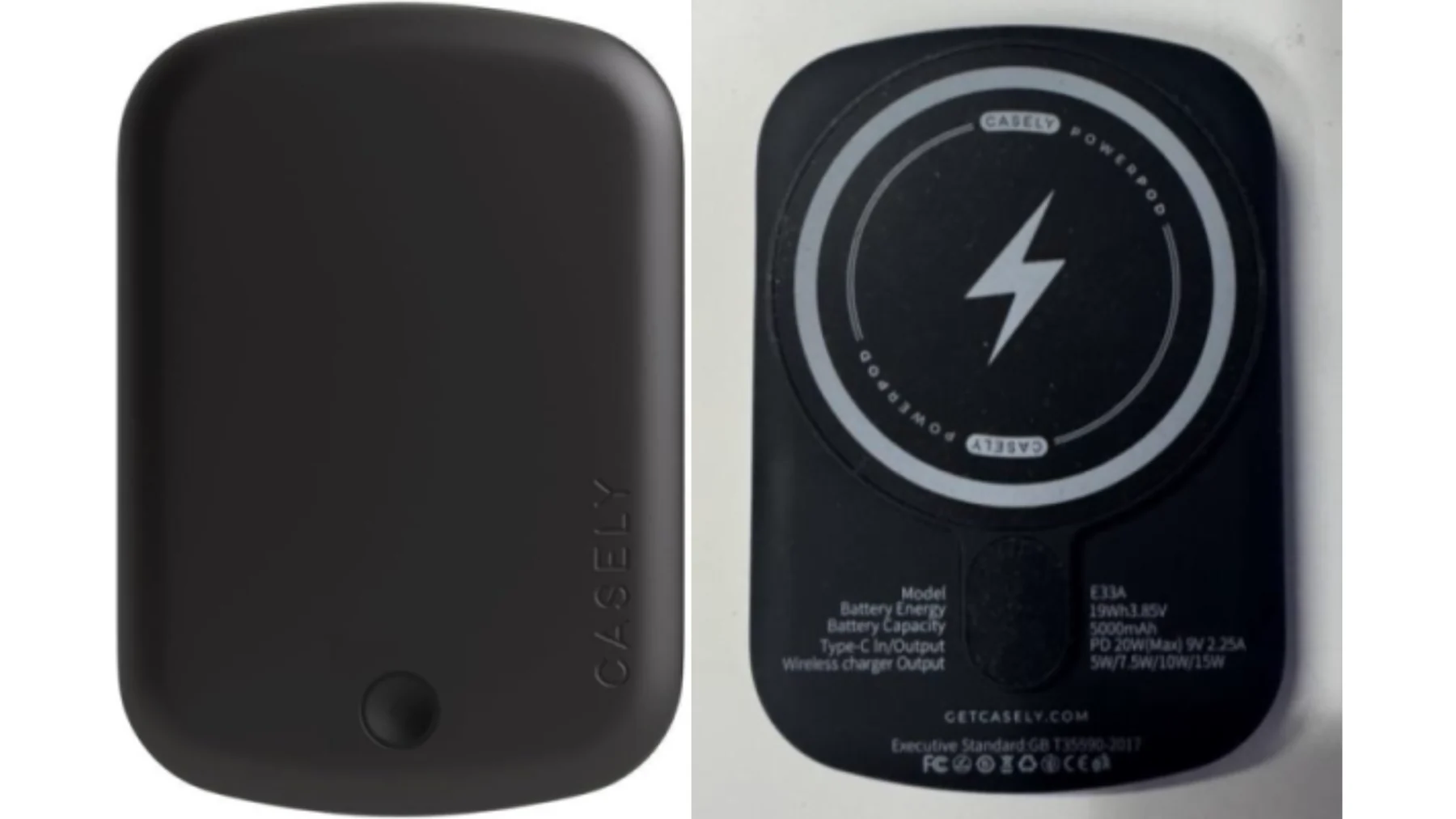
To check a power bank against a U.S. recall, start with the brand and exact model printed on the device. Look up those details in the official notice, then check any serial number, date code, or seller condition the notice specifies. If your power bank matches, stop using and charging it and follow the stated remedy. This selected list covers portable chargers sold through several U.S. retailers. It was checked on November 18, 2026. U.S. Consumer Product Safety Commission recall and warning search.
Check the label on the power bank you own
Read the markings on the case while the power bank is disconnected. Use the back, underside, and sides of the actual device. A product listing may combine capacities or color variants, and an order page may use a shortened name. Those records help locate a seller and date. The device label provides the evidence you need for the physical unit.
Record the exact spelling of the brand and copy all the characters in the model number. Check for a separate serial marked SN and a production or date code. A model identifies a design, while a separate serial or date rule may identify only a portion of the devices sold under that model. If the notice includes a photo, use it to locate the right printing on the case.
Match the brand, model and any serial rule together
The Anker PowerCore 10000 example shows how to match several fields. Its CPSC notice directs owners to the bottom of the power bank for model A1263 and the serial. The notice applies to U.S. A1263 units with qualifying serial numbers, which owners check through the official linked tool. The capacity printed on the case helps describe the item. Use the model and full serial to complete the actual check. CPSC A1263 notice and label details.
Check each power bank on its own, even if you ordered several together. If a model or serial is unreadable, save whatever markings can be read safely and search the official notice for alternate identification instructions or a company contact. Treat an incomplete match as unresolved. If your device is missing from the examples below, search the wider agency list using exact identifiers and check any relevant manufacturer page linked by the agency. Search electronics recalls.
Selected U.S. recalls across retailers
Use this table to choose a U.S. CPSC notice. The columns identify four separate recall programs, including products sold in stores and directly through brands. Compare the brand and model first. Where a row specifies a serial prefix, verify that prefix on the actual item. The notice gives the complete scope and the current procedure for anyone with a match.
| Brand and device | Identification to verify | Notice date and remedy |
|---|---|---|
| Casely Power Pods | Casely engraved on the front right and E33A on the back. The recall covers the Casely 5000mAh magnetic power bank. | Reannounced April 16, 2026. Free replacement. CPSC Casely notice |
| Flaunt magnetic battery charger | FLAUNT and E33A on the back label. Sold through Flaunt's website. | July 9, 2026. $65 refund by check or $80 store credit. CPSC Flaunt notice |
| XO Poppy Power Trip | Magnetic power bank PYPBK5M, sold at TJX and Marshalls. Compare the print and packaging shown in the notice. | September 3, 2026. Refund through the listed Truststone program. CPSC XO Poppy notice |
| Belkin portable power banks | BPB002 with a 35S serial prefix, or PB0003 with any serial. The notice separately covers certain charging stands. | November 13, 2025. Refund or store credit through Belkin. CPSC Belkin notice |
For the XO Poppy unit, the notice shows three variants. The cream package code is PY-PBK5M-CR2, the pink-bow print is PY-PBK5M-BW8, and the teddy-bear print is PY-PBK5M-TB2. Look immediately above the barcode on the bottom of the original packaging. If the box is gone, the official photos can help you identify the power bank when contacting the program. A receipt from TJX or Marshalls helps trace the purchase, and the item match still rests on the identifiers in the recall.
Two E33A labels can point to different notices
If the back of your charger reads E33A, look for which name is printed on the device. Casely's notice describes the engraving at the right of the front plate. Flaunt's notice describes its own front engraving and the brand on the back label next to the model. A similar pattern or button can help you recognize a photo, but the printed brand tells you which record to open.
The distinction matters when you ask for help. The Casely reannouncement describes a replacement. Flaunt describes a refund by check or a store credit. Each company sets out its own steps and photo requirements in its program. If you bought two chargers with the same model code from different brands, keep the photos and purchase records in separate files so the evidence goes to the right company.
Check the serial range when a notice covers several models
Belkin's notice is a good example of how a rule changes between models in one announcement. Find BPB002 near the top of the power bank's back, then look for the serial starting with 35S. For a power bank marked PB0003, the notice includes all serials. Read the printed model carefully, including the zeroes, and use Belkin's product photos to locate it.
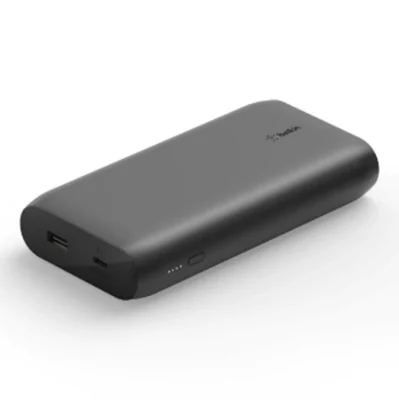
The same announcement also lists the MMA008 charging stand with a 57X serial prefix. Read the stand's label underneath. If your household has a stand and a portable charger, check their labels separately. The power bank's prefix belongs to the power bank row, and the stand's belongs to its own row. Belkin model and label support.
Use the dated notice for online marketplace purchases
A marketplace receipt can show both a platform and a separate seller. Open the order while you have the device label in front of you. The distinction matters when the safety notice applies to products sold through multiple channels, but the recall remedy names just one seller. HAIARA's W5 PRO is an example where both the receipt and the markings carry different information that you need.
CPSC's October 29, 2026 notice 27-056 covers a black HAIARA W5 PRO with 20W on the front and the model on the side, with no date code printed on that side. The recall applies to purchases from Mitrytech on Amazon. Check the seller field of the receipt. If that seller and the device markings match, the notice directs you to Mitrytech's full-refund process and states what evidence to submit. October HAIARA seller recall.
CPSC then issued the broader HAIARA product safety warning 27-077 on November 5, 2026. It describes W5 PRO units without a date code and identifies online sales at Amazon and Newegg. The warning directs consumers to stop using affected units and to follow local hazardous waste disposal procedures. If a receipt shows a different seller, read the stop-use warning and check your own purchase details before assuming that a particular refund channel is available. November HAIARA safety warning.
Find the applicable update or recall number
Read the published date, the notice number, and the remedy section together. CPSC's NEWDERY entry for ZHX-PB22 lists a September 24, 2026 recall, number 26-792, and a refund process. The page keeps the June 5, 2025 warning, number 25-327, in a separate section. Read that archived text as the earlier position and follow the dated recall for the remedy it now lists. NEWDERY notice and earlier warning.
Save the notice number with your precise model and seller. A search result can surface an older warning, and an order notification can direct you to a newer message without reproducing the device scope. Keep both sources handy while you compare them. For additional programs sold through Amazon, use the dedicated guides for Anker, INIU and NEWDERY checks and the four INIU BI-B41 serial codes.
Follow the remedy for the matched device
Open the consumer contact section in the notice for your model. That section tells you which company or recall administrator to contact. If the notice lists an official form, start from the link in the notice. Write down the program name and recall number as well as the model. For a marketplace order, keep the seller name alongside the store name. Those details make it easier to pick up the same case later or explain why you selected a specific program.
Look at the evidence the program requests before gathering it. Belkin's notice asks for front and back photos. It describes a refund based on the amount on a provided receipt or on the model's average sales price when the receipt is unavailable. It also gives a separate store-credit option. If your paperwork is missing, use those terms for the Belkin program and ask its official contact how it verifies an affected model. Different recall programs can ask for different proof. Belkin's current CPSC remedy terms.
Casely's replacement program illustrates a different request. Its notice calls for a photo of the front with the recall marking and date specified by the company, plus a photo showing the model on the back. If you have two matching devices, label their digital photos and check that each pair belongs to the same device before submitting. Read the instructions yourself so you can distinguish a request for a label photo from a request for proof of disposal. If the device is visibly damaged or unsafe to handle, tell the administrator from a safe location and ask what evidence you can provide using your existing records. Casely's current CPSC remedy terms.
If you only have a bank statement or gift record, see what it identifies before using it as support. A card charge may confirm the store and date. The order line or packaging may provide the model name, and the original buyer may have received a recall message. Keep what you can safely retrieve and let the listed administrator say which documents the program accepts. Note the time and method of each contact and keep any submission confirmation with the photos you sent.
When a remedy remains unresolved after you have contacted the listed company, CPSC's Recall Complaint Form lets you report that experience. Give the chronology, the notice link, and the steps you tried. If a power bank smoked, caught fire, or injured someone, document what happened through the agency's safety reporting portal. Address any immediate danger first and preserve observations you already have. CPSC Recall Complaint Form and SaferProducts.gov incident reporting.
Arrange disposal through an accepting local program
The disposal line in a recall notice is part of the safety instruction. For example, CPSC's NEWDERY notice says to keep the recalled power bank out of household trash, curbside recycling, and ordinary retail battery collection boxes. A municipal household hazardous waste center may accept a device with a recalled lithium-ion battery, and the agency directs consumers to ask first. Follow the instructions from the recall and the accepting local program together. CPSC disposal guidance in the NEWDERY recall.
EPA explains that lithium-ion batteries in household waste or recycling may be crushed in collection, transport, or sorting and start fires. A charger that appears discharged can still contain energy. Keep the affected item out of those streams and seek the appropriate collection route. If the exact battery or device requires separate handling, have the recall notice on hand when asking how to proceed. EPA guidance on used lithium-ion batteries.
Confirm the collection site accepts recalled lithium-ion devices
When you call, say that you have a recalled lithium-ion power bank, give its model, and state whether it is visibly damaged. Ask whether the program can accept that whole device, whether there is an appointment or specialized drop-off, and what instructions apply before it leaves your home. Use the number on the city or county waste program's own website so you reach the staff who can identify the local route.
If the first site declines it, contact the municipality again for further guidance. A store that accepts everyday rechargeable batteries can still have a different policy for recalled packs. A facility that accepts ordinary electronics may also require a separate route for recalled equipment. Ask for the appropriate next contact and follow the directions you receive for your particular device.
Keep the claim and the disposal instructions together
Check whether the remedy mentions photos or disposal confirmation. The NEWDERY notice asks for both. Casely's notice calls for two photos and directs owners to dispose of the recalled product promptly under local and state rules. If safe, save the required evidence as you follow the notice. Make a note of the official disposal instructions and what you already submitted, so you can answer follow-up questions without handling the device again.
If a program asks you to confirm disposal, read the form to see exactly what it asks you to document. When it requires a record from the collection site, check what the site can provide. Record the date once the drop-off has taken place.
Before carrying a damaged or abnormal device to a collection point, describe its condition from a safe place and get handling guidance from the program or the official contact. If there is smoke, fire, or immediate danger, get away and call emergency services. The U.S. Pipeline and Hazardous Materials Safety Administration describes additional transportation risks for recalled or damaged lithium batteries. Treat any shipping request as a separate question for the program, and leave the power bank intact while arranging help. PHMSA lithium battery transportation guidance.
Product Recall Checker is an independent information site. Use the official agency notice for your device's affected scope and remedy. If you are checking a model beyond this guide, start with the exact device code and search the latest product recall notices.
Comments
Comments are reviewed before publication. Do not post personal information, serial numbers, medical details, or emergency reports. For urgent safety concerns, use the official agency contact in the recall notice.
Sign in with Google to leave a comment
Loading comments...